Creating Processing Activities from HOPEX Objects
Importing data from HOPEX
HOPEX GDPR enables you to import manually processes and applications.
To import objects from HOPEX:
1. From the navigation menu, select Import > Import from HOPEX or Excel.
2. Select the file you wish to import and click OK at the bottom of the page (on the right hand-side).
After data import the activity owner may create:
• processing activities from business/organizational processes.
• processing elements from applications
Creating processing activities from processes
You can use a business or organizational process from other HOPEX solutions to create a processing activity.
To create a processing activity from a process:
1. From the navigation menu, select Import > BPA Processes.
A wizard appears.
2. Select a process in the left tree and drag and drop it to the right tree under a specific department.
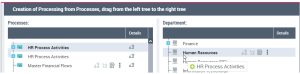
A processing activity has been created. You can now access it through the records of processing. For more information see Accessing the Records of Processing.
 If you have troubles creating a processing activity from a sub-processing, you may find it useful to check our FAQs. See About HOPEX GDPR Import and HOPEX Integration.
Creating processing elements from applications
An HOPEX application can become a processing element in HOPEX GDPR.
For more information, see Managing Processing Activity Elements.You can therefore use an application to create a processing element below an existing processing activity.
To create processing elements from applications:
1. From the navigation menu, select Import > Import > ITPM/ITA applications.
2. Select an application in the left tree and drag and drop it to the right tree under a specific department.
If there is no processing activity right below the department of interest, a processing activity wizard appears. The processing element is automatically created under this processing activity.