Assessing Risks
The first step in DPIA creation consists in defining and assessing risks.
To assess risks in HOPEX GDPR:
1. In the property page of a processing activity, select the DPIA tab.
2. Click Start DPIA.
3. In the DPIA creation wizard, select one of the tabs of the Risks on Privacy section:
• Illegitimate Access
• Data Loss
• Data Integrity
• Data Unavailability
• Unlawful Processing
Here you can create a risk assessment corresponding to different risk types.
4. Click New.
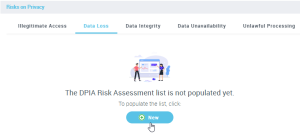
5. Specify risk properties as shown below.
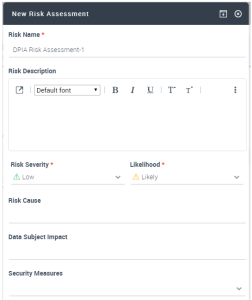
6. Enter the Risk Severity and Risk Likelihood for the risk you intend to assess.
 These fields are mandatory.
In addition, you can specify:
• Data Subject Impacts: main impacts on data subjects if the risk occurs
• Risk cause: most common causes which could lead to risk occurrence
• a group of Security Measures aimed at remediating the risk
Prerequisites: Security measures must have first been defined in the processing activity properties. See Specifying security measures on a processing activity.
Security measures are reference data defined by the functional administrator. They can be of three types (technical, organizational, certification). For more information, see Définir les mesures de sécurité.