Viewing Person Characteristics
The icon for a person is represented by:
•  when the person is created (name and writing access area defined) but does not have a login.
when the person is created (name and writing access area defined) but does not have a login.•  when the person has a login but is not fully configured (e-mail or profile assignment is not defined).
when the person has a login but is not fully configured (e-mail or profile assignment is not defined).•  when the person is configured as a HOPEX user:
when the person is configured as a HOPEX user:name, writing access area, login and e-mail address are specified and a profile is assigned to the person.
To view person characteristics:
1. Open the Users management window.
2. Select the Persons tab.
The list of persons appears with the characteristics of each person.
 You can modify these characteristics directly in this window (with a click in the corresponding field).
3. In the Persons list, select the person.
4. In the toolbar, click Properties  .
.
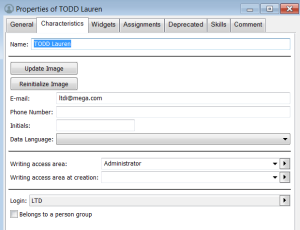
.5. From the Properties window for the person, click:
• the Characteristics tab to define or modify the person properties.
See Person Properties.See Defining a Person.• the General tab, History sub-tab to display the actions performed on the person.
• the Assignments tab to display and assign profiles to the person.