Querying Objects to be Translated
In the case of multilingual use of HOPEX, you can query objects to be translated in the repository.
 For more details on translation of objects, see "Using HOPEX in a Multilingual Context", page 180.
To query objects to be translated:
1. Connect to HOPEX.
2. In the menu bar, select Tools > Manage > Query Objects to be Translated.
The Query objects to be translated dialog box opens.
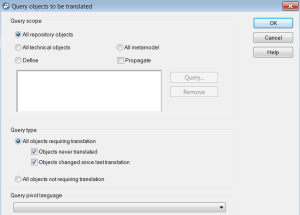
3. In the Query scope pane, define the query perimeter of the objects not translated:
• on All repository objects
• on All technical objects
• on All metamodel
• on specific items: select Define and click Query.
4. By default the search is performed on All objects requiring translation.
You can refine your query by clearing one of the options:
• Objects never translated
• Objects changed since last translation
If needed, you can perform the query on All objects not requiring translation.5. Click OK.
The query starts.
 Click Stop to interrupt the query in progress.
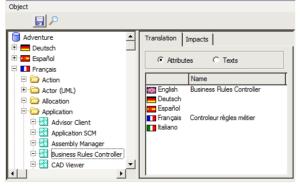
The List of objects to be translated dialog box opens. It indicates objects to be translated, classified in the menu tree by language and object type.
6. Enter translation of the object names directly in this dialog box.
 When you want to change language for display of the HOPEX interface, you must close then reopen a session. The names of menus and tabs are then refreshed.