Report Chapter Properties
From the Report Chapter properties you can access information regarding:
• its Characteristics,
• its Definitions (specific to Report Chapters based on Report Data Views),
• its Filters Binding (specific to Report Chapters based on Report Data Views).
Characteristics
In Characteristics:
• for a Report Chapter based on a macro:
• You can define whether the Report Chapter can be exported in Excel (Is compatible with Excel), PDF (Is compatible with PDF) or RTF (Is compatible with RTF compatibility) format.
• You can define the name you want to be displayed for the Report Chapter (_GUIName).
• in the Implementation section, you can define on which macro the Report Chapter is based.
• In the Snapshot section, you can define a snapshot for a fast Report Chapter display. The snapshot is also used for export operations.

Definitions (for Report Chapters based on Report Data Views)
Definitions shows:
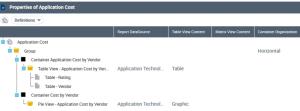
• a global view of the Report Chapter constituents and structure (as a tree view)
• how each of its following constituents are displayed:
• (if any) Container Group: horizontal, tab or vertical.
• Report Data View: table, graphic, or table and graphic.
For example, the "Application Cost" Report Chapter includes two Report Data Views showing a Table and a graphic on the same row (Group Container Organization: "horizontal")
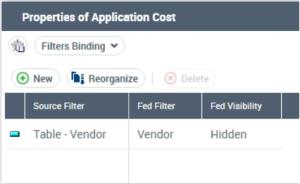
Filters Binding (for Report Chapters based on Report Data Views)
A filter enables to restrict a Report DataSet column values, which are considered in the report. This Report DataSet column is not necessarily part of the report.
Filters Binding enables to feed a filter content with another filter content. Both filters must be of the same type.
To do so you need to create a binding object.