Information associated with workflow transition
You can allow the user who triggers the workflow transition to specify additional information.
You can allow the user to:
• add a comment
• specify one or several properties in the form of fields
• attach objects
 This information can be made mandatory via permissions. For more details on configuration of permissions, see Configuring Permissions (CRUDs) on Objects.
To enable entry of additional information on workflow transitions:
 In the properties dialog box of the workflow transition, select the Associated Information tab.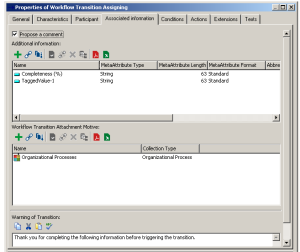
Enabling comment entry
To offer the user the possibility of entering a comment when triggering a workflow transition:
Select the Propose a Comment check box.Adding properties on transitions
To offer the possibility of specifying properties when triggering a workflow transition:
Create TaggedValues in the Additional Information frame.At triggering of the corresponding workflow transition, the dialog box proposed to the user will display the TaggedValues value specified here.
Opening a help tooltip in the transition dialog box
You can display a help tooltip to guide your users at triggering of the workflow transition.
To enter the text to appear in the help tooltip:
Enter the text to be presented to users in the Warning of Transition frame.Transition attachments
To offer the user the possibility of attaching HOPEX objects at workflow transition triggering:
1. Create a motive in the Workflow Transition Attachment Motive frame, for example "Items to provide".
An object attachment motive specifies the reason for which the objects are used in the framework of a workflow transition. 2. Select the motive, and in its properties dialog box select a collection type, which corresponds to a MetaClass.
The same MetaClass can appear in several motives.Motives are used particularly:
• in the framework of sending e-mails
• to list attachments
• to include objects in the form of attachments in the case of documents
MetaClasses that can be the subject of attachments in e-mails are: documents, reports, books, external references.• to associate objects with a notification
For more details on configuration of notifications or e-mails, see:When the user triggers a transition, a dialog box proposes connection of objects to be attached.