Sending the Notification Letter
Having completed specification required for audit execution, the audit director can send a notification letter to inform persons who will be auditees in the course of the audit.
Sending this notification letter is not included in the workflow. It precedes the next step in the workflow which consists of publishing the audit. See Publishing Audits.
Creating notification letters
To create the audit notification letter:
1. Click the icon of the audit.
Its pop-up menu appears.
2. Select Deliverables > Notification Letter.
A message asks if you want to open or save the file.
The document presents the comment entered in characteristics of the audit.
When the document has been saved, you can open and modify it. You can also connect it to the audit as a business document, under the notification letters category.
Connecting the notification letter to the audit
The file is generated from audit content, but is not connected by default to the audit.
To connect the notification letter to the audit and make it a business document:
1. Open properties of the audit.
2. Select the Documents page.
3. Click the New button.
The Creation of Business Document dialog box appears.
4. Indicate the business document name.
5. In File Location, click the Browse button.
The File Location dialog box appears.
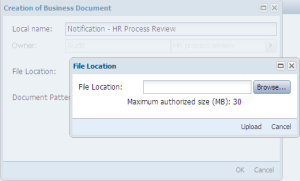
6. Click Browse and select the file.
7. Click Upload.
8. In the document creation dialog box, in Document Pattern, select "Notification Letter".
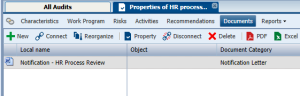
9. Click OK.
The document appears in the list of documents attached to the audit.
For more details on business documents, see "Using Business Documents".