Sending Recommendations
Audit team members meet to review audit findings and information collected during audit activities The resulting audit conclusions can indicate a need for recommendations.
 A recommendation describes what must be done to correct non-compliance detected during an audit.
There is only one person responsible for recommendation in order to assign responsibility precisely.
 You can however divide the recommendation into several actions when creating the action plan. Each action can be assigned to a different user.
Creating recommendations
Recommendations are created from audit findings.
To create a recommendation.
1. In the properties page of a finding, section Recommendations, click the New button.
The recommendation appears in the section.
To define properties of the recommendation:
1. Select the recommendation and click Property.
2. Modify its Name if required.
3. Select a level of Priority.
4. Enter the text of your recommendation in the Details box.
5. Select the Recommendation Responsible.
6. If required, enter the Correspondent.
The correspondent is the point of contact in the audit team of the department in which the recommendation is applied.7. Click OK.
You can also create recommendations from the tree in the Work Program tab of an audit.Viewing recommendations
Recommendations can be viewed:
• in the page of the finding to which they are attached
• in the Recommendations tab of the owner audit page:
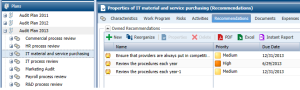
In the page of an audit, the Recommendations tab displays:
• The Owned Recommendations
• The Follow-up Recommendations, in the case of a follow-up audit. These recommendations are linked to the source audit, and not yet closed.
When a recommendation is linked to a follow-up audit, the Follow-up attribute linked to the recommendation is checked.
For more details on follow-up audit, see Creating follow-up audits.