Describing Concept Variations
Certain business concepts are versions of other concepts; they are characterized by the same concepts.
For example, "Subscription" concepts are broken down into "Book Subscription" and "Media Subscription". These two subscription types inherit the links "Subscriber" and "Member" at the level of the "Subscription" concept.
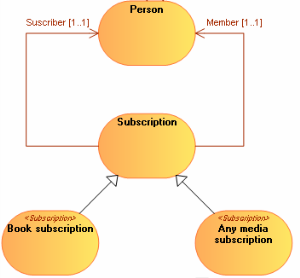
This relationship is described by a Variation.
 A variation describes how a concept can be varied under another form. The variant is an object similar to the varied object, but with properties or relationships that may differ.
 For more details on variations and substitutions, see the HOPEX Common Features guide, "Handling Repository Objects", "Object Variations".
Accessing concept variations
To access concept variations
1. Open the properties of a concept.
2. Select the Variation tab.
The list of variations associated with the concept appears.
Creating a concept variation from a concept diagram
You can specify that a concept inherits characteristics defined for another concept.
For example, the "Book Subscription" concept inherits from the "Subscription" concept.
To specify, based on a business information area, that a concept is a variation of another concept:
1. In the insert toolbar, click the Link button.
2. Click the object to be varied and drag the pointer to the new concept before releasing the mouse button.
3. Specify the Name and click Add.
A directional link from the concept to be varied to the root concept appears.
The variation is represented by a link, but it is in fact a HOPEX object.The variation creation wizard opens.
Creating a concept structural component variation
A Variation can also be created between two Concept Structural Components.
For example, the "Subscriber" is also a "Member".
To define a variation between two concept structural components, they should be connected to the same concepts, either directly or via variations.
To create a variation between two concept structural components:
1. Open the properties of the concept structural component to be varied.
2. Select the Variation tab.
3. Click the New button.
The variation creation wizard opens.
4. Select the options:
• "Initialization of attributes"
• "Initialization of diagrams" so that the variation appears in diagrams.
5. Click OK.
The variation is created.
A variation between Concept Structural Components is represented graphically in a concept structure diagram. For more details, see Concept structure diagram.Creating a concept structural component substitution
If, unlike a variation, a link is another definition of another link, you must create a substitution.
A substitution determines which element can be used to replace another, or is effectively replaced by an element existing in a given context (for example in the context of a variation). Unlike a variation, a substitution does not involve inheritance but a functional equivalence.For more details on variations and substitutions, see the HOPEX Common Features guide, "Handling Repository Objects", "Object Variations".To define a substitution between two concept structural components, they should be connected to the same concepts, either directly or via variations.
To create a substitution between two concept structural components from a concept structure diagram:
1. In the insert toolbar, click the Substitution button.
2. Click the structural components to be substituted and drag the pointer to the substituting structural components before releasing the mouse button.
3. Specify the Name and click Add.
A dotted line directional link from the structural link to be substituted to the substituting structural component appears.
The substitution is represented by a link, but it is in fact a HOPEX object.