Organizing Folders in Navigation Trees
Folders are used in encyclopedic trees to organize the objects in the tree. For this, HOPEX offers two possibilities:
• you can create and name your folders
• you can use the encyclopedic classification options
Creating Folders in Navigation Trees
To find your objects more easily in navigators you can create your own groups.
To do this, HOPEX proposes creating object folders. You can for example create folders grouping your objects to classify them according to your own criteria.
To create folders:
 Right-click the object type for which you wish to create a folder and select New > Folder of
You can move your objects to the folder or folders created so that you can find them more easily.
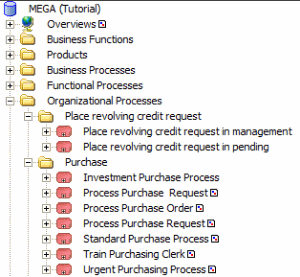
Using the encyclopedic classification options
The display time of a folder that contains a large number of objects can be long.
To reduce this time, you can use these options to classify your objects in alphabetical order in "volumes" represented by folders created and updated automatically by HOPEX.
The name attributed to each volume comprises the name of the first object in the volume and the first letter of the last object.
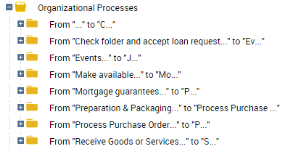
To activate these options:
1. In the following desktop:
• (HOPEX Windows Front-End) select Tools > Options.
• (HOPEX Web Front-End) Select Main Menu > Settings > Options
2. In the tree on the left, click Workspace.
3. On the right side, complete the following fields:
• Trigger threshold for Encyclopedic Classification in the Browser: this is the number of objects from which automatic classification is triggered within each folder concerned. By default this perspective is set to 200.
 If the threshold is equal to zero, the encyclopedic classification is disabled.
• Number of Elements per Encylopedic Volume, by default set to 200.