Exporting Your Private Workspace Log
You can create an export file and save it in your work folder.
The export file can be exported in format:
• logfile text format (.mgl).
The format of the exported file name is "LOGmmdd.mgl", where "mmdd" represents logfile export date month and day.
• XML MEGA format (.xmg)
The exported file is in the form of an XML file containing commands or data (objects and links).
To export the work done in the current private workspace in the form of a command file:
1. Click on the Tools > Manage > Export Updates Logfile.
The Export Repository Private Workspace Log dialog box opens.
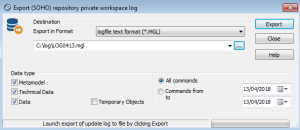
2. Select export format.
3. (Optional) If necessary, modify the data export file name and save folder proposed as default. The Browse button  allows you to browse the folder tree and select the folder in which the file will be placed.
allows you to browse the folder tree and select the folder in which the file will be placed.4. In the Data Type frame, select the type of exported modifications:
• Metamodel if you want to extract the metamodel from the system repository. This is useful if the standard metamodel has been modified.
• Technical Data if you want to include in your file the changes made to data such as descriptors and queries.
• Data if you only want to export changes made to repository data, particularly the workspace.
• Temporary Objects - these objects are created when you execute requests, when you consult objects (stored in the history), etc. Generally you will not need to export these objects.
5. (Optional) If you want to export only those commands that correspond with a defined period, select Commands from / to and specify the dates.
6. Click Export.
The Execution Report appears.
7. Click OK.
The file is exported and saved in the specified folder.
The user can subsequently import this logfile, for example into a new private workspace.