Spacing the Elements
To equally space selected drawing objects:
1. Select the drawing objects by holding down the <Shift> key and clicking on them.
2. Right-click the object selection and select a command from the Space sub-menu according to the direction required.
 So that these commands are available, it is necessary to select at least three elements.
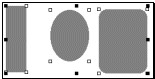
Using the commands Space > Horizontally and Vertically, the space between the three drawing objects becomes identical.
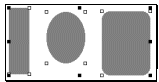
Using the commands Space Horizontal Centers or Vertical Centers, the distance between centers of the three drawing objects becomes identical.