Object status indicators
You will note the presence of icons below certain objects in your diagrams. These icons give indications on object status.
For example, when an object in a diagram is described by one or more other diagrams, a status indicator appears below the object shape. This indicator reminds you that you can zoom on the object.
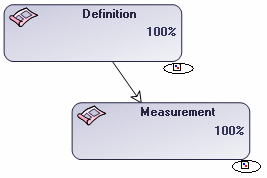
Example of state indicators (objects described by a diagram)
It is possible to configure display of these icons. To do that, open the Options dialog box and select Status Indicators. In the dialog box that opens, select or clear the desired options.
 | the object is owned by the parent object |
 | the object is not owned by the parent object |
 | the object is described by a diagram |
 | the object is described by a document |
 | the object cannot be modified (not authorized and/or locked) |
 | the object can be modified (authorized and not locked) |
 | the object has variants |
 | the object is a variant |
 | The object has a review note |