Comparing Two Diagram States
HOPEX allows you to compare several states of the same diagram in time. The diagram has been photographed at different moments at creation of repository snapshots.
 This functionality is available with an RDBMS format repository only. You must first have created repository snapshots. For more details, see Managing Repository Snapshots.
 A repository snapshot identifies an archived state of the repository.
This functionality provides an interface enabling, for example, viewing of certain objects that have been added or deleted in a diagram since a given repository state. It consists of time navigation applied to diagrams.
To run diagram comparison:
1. In the pop-up menu of a diagram, select Manage > Compare with an archived state.
The repository archived state selection tool opens.
You must select a repository state associated with an object of one of the following types:
• a repository snapshot
• a dispatch
• a design task
2. Click Next then Finish.
A comparison dialog box opens:
• The left pane presents the archived version of the diagram
• The right pane presents the current version of the diagram
You can modify arrangement of panes (position them at the side or at the bottom).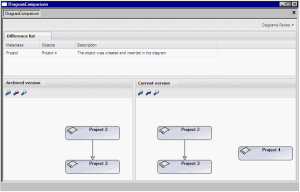
3. Double-click a difference title
Example: double-click the title indicating that an object has been created between two repository states.

Modifications carried out in the diagram blink (in this example, the object created).
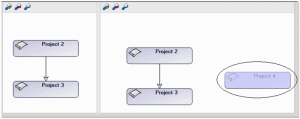 You can zoom in/zoom out or request view of the complete diagram in a window by clicking one of the following buttons:
  .If you wish to return to an earlier diagram state, you must use the "Compare and Align" functionality (see Comparing and Aligning Two Objects States Over Time).