Accessing Work Context Elements
To access the list of libraries and enterprises in the repository:
 (HOPEX Windows Front-End) Select the Home navigation pane, which is displayed by default.
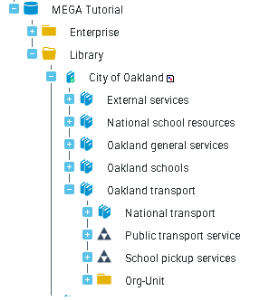 (HOPEX Web Front-End solutions) Using the Environment desktop, select Enterprise and select the Container Tree tile.
 The HOPEX library, automatically created for each new repository, contains the list of objects necessary for operation of installed HOPEX products.