Describing an Application System Environment with HOPEX IT Architecture
 An application system environment allows presenting the other application systems, applications or micro-services with which this application system can interact.
Accessing the list of application system environments
To access the list of application system environments from the Application Architecture navigation pane:
 Select Functional Architecture > Application System Environment.
The list of application system environments appears in the edit area.
Creating an application system environment
To create an application system environment:
1. From the Application Architecture navigation pane, select Functional Architecture > Application System Environments.
The lists of application system environments appear in the edit area.
2. Click New.
The Creation of Application System Environment window opens.
3. Enter the Name of your application system environment and click OK.
The new application system environment appears in the list.
Application system environment properties
The Characteristics properties page for an application system environment provides access to:
• its Owner, by default during creation of an application system environment, the current library.
• its Name,
• the text of its Description.
With HOPEX IT Architecture an application system environment is described by other property pages. See HOPEX IT Architecture properties pages content.
Describing an application system environment diagram
An application system environment is described by an application system environment diagram that describes the interactions between the internal application systems, its users and the partner application systems.
 For more details on use of a structure diagram, see Creating a structure diagram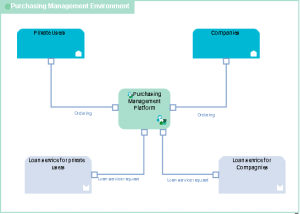
Environment diagram for the "Purchasing Requests Processing" application system.
Purchase requests are formulated by private users or by companies in different contractual conditions.
The "Purchasing Request Processing" application system offers a loan service to its clients within the context of payment management.
The elements of an application system environment diagram are:
• the main application system principal described by the environment.
An application system is an assembly of other application systems, applications and end users interacting with application components to implement one or several functions.• partner application systems that represent the other application system with which the main application system described by the environment interacts.
In this example, this concerns two loan services offered to individuals and companies.
A partner application system is an application system external to the environment of the described application service. The partner application system can be a service supplier or a service consumer with respect to application system users.• The categories of users of services provided by the environment are represented either by an Org-Unit or by a Position Type.
An org-unit represents a person or a group of persons that intervenes in the enterprise business processes or information system. An org-unit can be internal or external to the enterprise. An internal org-unit is an organizational element of enterprise structure such as a management, department, or job function. It is defined at a level depending on the degree of detail to be provided on the organization (see org-unit type). Example: financial management, sales management, marketing department, account manager. An external org-unit is an external entity that exchanges flows with the enterprise. Example: customer, supplier, government office.A position type represents a status assigned to an individual or a group of individuals with the aim of defining an organization or a hierarchy.This concerns two user categories: individuals and companies.
• interactions between components
An interaction represents a contract established in a specific context between autonomous entities that are internal or external to an enterprise. These entities can be enterprise org-units, applications, activities or processes, as well as external org-units. The content of this contract is described by an exchange contract.