Describing Application Processes
 A system process is the executable representation of a process. the events of the workflow, the tasks to be carried out during the processing, the algorithmic elements used to specify the way in which the tasks follow each other, the information flows exchanged with the participants.
Accessing the list of application processes
To access the list of application processes from the Application Architecture navigation pane:
 Select Functional Architecture > Application Processes.
The list of application processes appears in the edit area.
Creating a system process diagram
To create an application process diagram:
Right-click the application process that interests you and select New > Application Process Diagram.The diagram opens in the edit area. The frame of the application process described appears in the diagram.
System Process example
The diagram below represents purchase request processing.
• A product search is carried out from the referenced products repository.
• If the product is new, search for a supplier and comparative study of prices is carried out. An order is then sent and the process ends.
• If the product is referenced, stock is analyzed.
• If stock is sufficient, a "Make available" request is activated and the process ends.
• If stock is less than minimum stock, an order is sent to the supplier and the process ends.
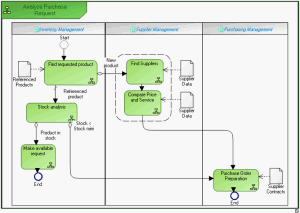
"Purchasing request" application process
 For more details on the use of functional processes, see the HOPEX Business Process Analysis guide, chapter "System Processes", page 81.