Creating an Application Technical Architecture
 An application technical architecture describes one of the configurations possible for application deployment. It describes how the different technical areas of the application are connected to each other and the technologies and the communication protocols that they use. An application can have a number of possible technical architectures (E.g.: autonomous installation, horizontal or vertical deployment, etc.)
 For more details on the use of a technical architecture, see Describing a Computing Device.
The application technical architecture below presents the application technical areas for eCommerce and customer management. The technical communication line between these two components is based on the https communication protocol.
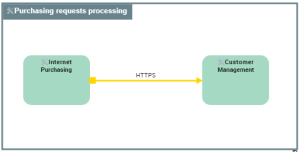
Example of the application technical architecture for "Purchasing Request Processing".
An application technical architecture is described by an application technical architecture diagram composed of the following elements:
• Application Technical Areas,
An application technical area represents an organizational element of an application according to technical criteria. For example, this can be the user interface or a process. Each application technical area is associated with one or more technologies. The deployment of several application technical areas is necessary for the application to be operation.• Technical Data Areas,
A data technical area represents an organizational element of an application used to access the data necessary for the operation of this application. Each application technical area is associated with one or more technologies (E.g.: Oracle 12, SQL Server 2012, etc.). A data technical area can allow access to one or more data stores.• Technical Communication Lines.
A technical communication line represents a technical connection between architectures or application technical areas through input and output technical ports. The output technical port of an architecture or a technical area requires opening the communication line to the input technical port of the other area or technical architecture.Accessing the application technical architectures
To access the list of application technical architectures from the Application Architecture navigation pane:
 Select Technical Architecture > Technical Architectures.
The list of technical architectures appears in the edit area.
Properties of an application technical architecture
The complete description of an application technical architecture can be accessed from its property pages.
The Characteristics property page of an application technical architecture provides access to:
• Its Owner, by default the application specified when it was created.
• its Name,
• the text of its Description.
With HOPEX IT Architecture an application technical architecture is described by other property pages. See HOPEX IT Architecture properties pages content.