Service catalog reports
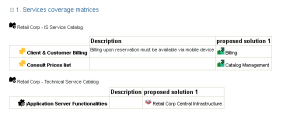
With a report, you can determine, for a list of service catalogs, the list of functionalities covered, and for each of them, the implementation means.
Report example
The example below shows the functionalities covered by several service catalogs as well as elements that implement these functionalities.
Report parameters
This consists of defining report input data.
Parameters | Parameter type | Constraints |
|---|---|---|
List of service catalogs | All types of service catalogs: - information, - technical, - hardware. | A mandatory catalog. |
Creating a service catalog report
To create a service catalog report:
1. From the Catalogs navigation pane, select Reports.
A new report opens in the edit area.
2. In the Parameters section, in the Service Catalog field, select the service catalogs that you want to present in your report.
3. Click Refresh the Report.
The new report appears.