Creating a System Process Diagram
To create a system process diagram:
 Right-click the process name and select System Process Diagram.
The system process algorithm can be expressed by sequencing of tasks and decisions.
Example
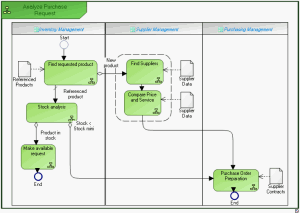
The diagram below represents purchase request processing.
• A product search is carried out from the referenced products repository.
• If the product is new, search for a supplier and comparative study of prices is carried out. An order is then sent and the process ends.
• If the product is referenced, stock is analyzed.
• If stock is sufficient, a "Make available" request is activated and the process ends.
• If stock is less than minimum stock, an order is sent to the supplier and the process ends.
See also:
