Connecting a System Process to an Organizational Process
To specify that an organizational process is implemented by a system process in a given context, you must create a contextualization link between the two objects.
 A contextualization allows specification of the implementation of a process by another process in a specific context, such as the geographical location on a site.
For example, the "Process Urgent Purchase Request" process is implemented by the "Analyze Purchase Request" system process to assure speed and efficiency of processing.
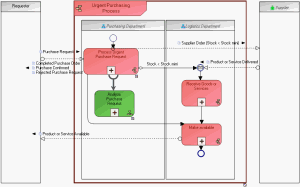
To create a connection between an organizational process and a system process from an organizational process diagram:
1. Click the  Views and Details button in the diagram toolbar.
Views and Details button in the diagram toolbar.2. Select the Implementation Contexts check box.
3. Click OK.
The Contextualization and System Process
  buttons appear in the insert toolbar.
and System Process buttons appear in the insert toolbar.4. Click the Contextualization button in the insert toolbar.
button in the insert toolbar.5. Click the organizational process and, holding the mouse button down, drag the cursor to the system process and release the mouse button.
The contextualization appears in the diagram.