Client expectations and painpoints
The expectations and painpoints are specific to each persona with respect to a customer journey step.
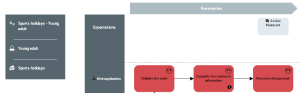
Adding persona expectations to customer journey mapping
 An external org-unit is an external entity that exchanges flows with the enterprise. Example: customer, supplier, government office.
The expectations of a customer journey are also connected to personas and they must also be connected to the steps in the customer journey that use them.
 The list of expectations of a customer journey is accessed from the Characteristics properties window, in the Phases section.The list of expectations of a persona is accessed from the Customer Journey properties window of the persona, in the Customer Expectations section.For more details, see Specifying the expectations of a persona.
To specify that a new customer expectation is connected to a customer journey:
1. Click the Step tab to access the list of steps in the customer journey.
2. Select the step that you wish to connect to an expectation and click in the Expectations.
A window appears with the list of customer expectations connected to the mapping of the customer journey.
To complete the list of expectations proposed, click Connect.3. Click Add to create a new expectation.
The new customer expectation appears in the list of customer journey expectations.
4. Change the name of the customer expectation.
5. Select the expectations that you want to connect to the step and click on the outside of the selection window pane.
The customer expectations selected appear in the swimlane of the step.
Defining customer painpoints
A painpoint describes the difficulties encountered by a persona when carrying out a step in the customer journey.To specify that a new painpoint is connected to a customer journey:
1. Click the Step tab to access the list of steps in the customer journey.
2. Select the step that you wish to connect to an expectation and click in the Painpoints column.
A selection window appears with the list of painpoints connected to the mapping of the customer journey.
To complete the list of painpoints proposed, click Connect.3. Click Add to create a new painpoint.
The new painpoint appears in the list of customer journey painpoints.
4. Specify the name of the painpoint.
5. Select the painpoints that you want to connect to the step and click on the outside of the selection window pane.
The painpoints selected appear in the swimlane of the step.