Describing Exchanges
The sequence flow of messages exchanged during a conversation can be described by an exchange diagram.
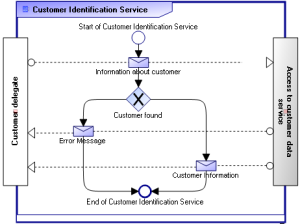
"Customer Identification Service" Exchange Diagram
The customer identification service protocol begins by sending information enabling identification of the customer. An error message appears if the customer is not found, otherwise customer information is sent (customer identification, status of orders, etc.).
Creating an exchange diagram (BPMN)
The procedure varies slightly depending on whether you are in HOPEX Windows Front-End or HOPEX Web Front-End.
To create an exchange diagram:
1. Right-click the conversation containing the exchange.
2. In the pop-up menu of the exchange, select New > Exchange Diagram (BPMN).
The diagram opens. The exchange frame is positioned and the two roles (Consumer and Supplier) are created. The message flows associated with the exchange are also positioned in the diagram.