Record of Notices
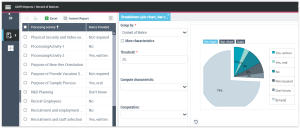
This report contains all notices used by the business in the different processing activities.
To launch this report:
 In the navigation menu select Follow-up and Reports > Record of Notices.
The list provides:
• the name of processing activities
• whether a notice has been provided or not and how (oral or written)
The information is retrieved from the Data Subject Right and Notice management section of processing activities. You can modify the information here by opening the processing activity property page and editing the relevant section.
 For more information, see Data Subject Right and Notice Management.
To launch a graphical report of notice management:
1. Select the processing activities of interest to you and click Instant Report.
2. Select the type of graphical representation which suits best, for example breakdown (pie chart, bar chart).