Organization of internal org-units
The different org-units concerned must be involved at each step of the risk management project via a communication and consultation process.
This enables building a solution that will be better accepted by the different stakeholders.
to access all entities of the organization with the Risk Designer or Process Manager from the Design pane:
1. Select Organization > Org-Units.
2. Select All Org-Units tab.
The list of existing actors appears.
To define the list of org-units concerned, HOPEX Risk Mapper enables you to enter the enterprise organizational chart.
To do this, from an org-unit,select New > Organizational Chart.
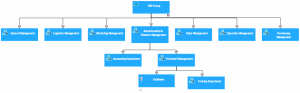
Enterprise hierarchical and functional organizational chart
 For more information on organizational charts, see "Organizational Chart and Responsibilities" in HOPEX Business Process Analysis
You can also define objectives and requirements for each organization unit.
For more information on defining objectives, see Organization objectives and requirements.