Populating a BPMN Diagram from a Solman Structure
You can update a BPMN diagram by drag and dropping elements from a Solman structure.
To update a BPMN diagram:
1. From the Solution Manager navigation window select an element and drag it to the BPMN diagram you want to update, for example a business process diagram.
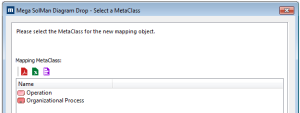
A wizard asks you which object type (metaclass) you want to use to create the corresponding object.
2. In the Mapping Metaclass frame, select an object type, for example "Functional Process".
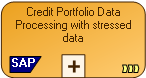
A new object is created, with "SAP" indicated on the shape.
3. Create in the same way the different objects needed in your diagram.

If at some point you cannot drag-and-drop objects, close your diagram and reopen it.
4. Arrange your diagram and create links betweens objects accordingly.
If you try to drag-and-drop an object that has already been created in the diagram, the wizard asks you if you want to:
• create a new mapping object
• use an existing mapping object
If you delete an object in the
HOPEX SAP Blueprint hierarchy, the corresponding object in the BPMN diagram is not deleted.
You have created a BPMN diagram from a SolMan structure.