Activating/Deactivating SolMan Objects
SAP provides many Scenarios with many Processes. Not all these objects are relevant to any given Project. As such, SAP Solution Manager offers the possibility of activating or deactivating these objects according to Project requirements.
All objects imported from SAP Solution Manager can be activated or deactivated within HOPEX. This is done with the "Is Active" attribute that can be found on objects of the following MetaClasses:
• SolMan Scenario
• SolMan Organizational Unit
• SolMan Master Data
• SolMan Process
• SolMan ProcessStep
• SAP Transaction
The "Is Active" attribute corresponds to the same attribute in Solution Manager. It is used to activate/deactivate objects of the SAP system.
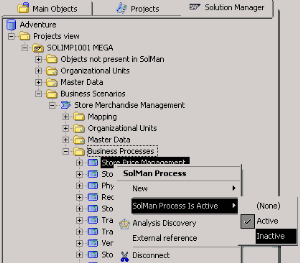
To set the "Is Active" attribute:
1. In the Solution Manager navigation tree right-click an object.
2. In the pop-up menu that appears select Inactive.
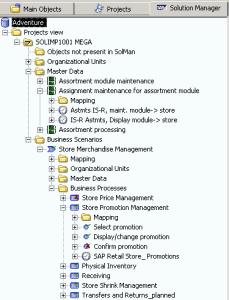
The object now appears with a red cross indicating its inactive state. When objects are Active they are displayed with a green checkmark.
The "Is Active" attribute behaves as follows:
• If an object is deactivated, all its sub-objects are inactive.

When an object is deactivated, all its sub-objects are seen as deactivated however their active state is restored when this object is reactivated.
• If an object is activated, all its super-objects are activated.
When you activate an object, the objects above this object in the tree, including the parent object, are also activated.
The Active/Inactive status associated to each SolMan object indicates whether or not the object (and its sub-hierarchy) is to be used in the project. Inactive objects are not used in projects but are still present in the project and are still exchanged between
HOPEX and SAP Solution Manager. At any moment during the project, inactive objects can be activated.