The NOV-1 High-Level Operational Concept Graphic Chapter
This chapter gives access to all the general documentation regarding the architecture.
First, the chapter shows the "High-Level Operational Graphic" diagram, which gives a general understanding of the architecture.
The diagram is followed by a list of all notes linked to the architecture, then a table with the external references linked to the architecture. Depending on the report format the external references are displayed as a hyperlink (HTML) or a name with the complete address of the external document.

When external references are added to the "High-Level Graphic" diagram (Library diagram in
HOPEX terminology), they are not automatically linked to the architecture. This is so because in
HOPEX external references can be added to any diagram, diagrams which are not necessarily linked to architectures. To ensure that external references are linked to an architecture, this link must be made from the
Properties dialog box,
General tab,
References sub-tab of the architecture in the NAF navigator window or the NAF start page. The external references then appear under the architecture in the NAF navigation window and the NAF start page.
A table of the cited items is also inserted in the chapter with their name, type and comment.
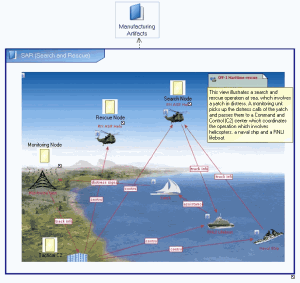
The figure below shows an example of a Library diagram which includes JPEG images and vector shapes. This is a HOPEX diagram so it can also include HOPEX objects allowing access to detailed definitions.
Example of an NOV-1 Library Diagram