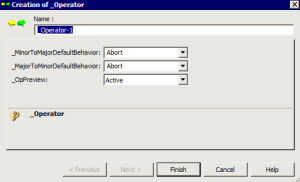
Creating a New Perimeter
To create a new perimeter:
1. In the MetaStudio navigation window, expand the Perimeters folder.
2. Right-click the Customized Perimeters folder and select New > Customized Perimeters.
3. Enter the Name of the perimeter.
4. Define characteristics of the perimeter:
• _MinorToMajorDefaultBehavior represents the default behavior of links of major objects to minor objects.

The default value "Abort" (links not propagated) avoids generating large volumes of objects.
• _MinorToMajorDefaultBehavior represents the default behavior of links of minor objects to major objects.
The default value "Abort" (links not propagated) avoids generating large volumes of objects.
Default value "Active"
5. Click Finish.
The new server appears in the list of Customized Perimeters.