Creating MetaAttributes (Characteristics)
To create a MetaAttribute:
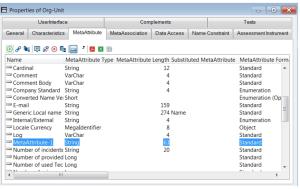
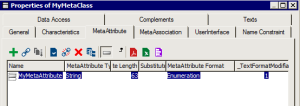
1. Open the Properties window of a MetaClass or MetaAssociationEnd.
2. In the
MetaAttributes tab, click
New 
.
The new MetaAttribute is created and appears in the list.

When a MetaClass is created, the “Name” and “Comment” attributes are assigned to it automatically.
The "Absolute identifier", "Authorization", "Creator Name", "Creation Date", "Modifier Name", and "Modification Date" attributes are also available automatically when an object type is created.
The names of the attributes that can be used in queries are limited to 32 characters.
3. In the MetaAttribute Type field select the attribute format.
By default the attribute format value is "String".

Do not change the MetaAttribute Type value after creation. Otherwise, if data has already been created, you may loose it.
Ab | MetaAttribute Type | Meaning | MetaAttribute Length |
X | String | Alphanumeric | 1 to 159 |
D | DateTime | Date | N/A |
To | VarChar | ASCII text | N/A |
B | VarBinary | Binary text (reserved) | N/A |
1 | Boolean | Boolean (0 or 1) | N/A |
S | Short | Integer (0-65535) | N/A |
L | Long | Integer (0 - 4294967295) | N/A |
Q | Binary | Binary (reserved) | N/A |
H | Double | Integer (0 - 18446744073709551616) | N/A |
F | Float | Floating number | N/A |
The "X" and "9" formats must have an indicated length (MetaAttribute Length).
With the Date format ("D"), the dates are entered in the format "YYYY/MM/DD HH:MM:SS". In windows where dates can be entered, the format used is the one defined in the Windows configuration.
MetaAttribute Format enables indication that external values are stored in a table (value T).
Tabulated characteristic values are saved with the technical data.
Text type characteristic
By default, each new object type is connected to the "Comment" characteristic.
Characteristic MetaText Format specifies ANSI, RTF or HTML text format.
Tabulated characteristic
A tabulated characteristic is a characteristic associated with a series of tabulated values, such as Information-Class, Org-Unit-Type, and Message-Type.
You can change a standard characteristic to a tabulated characteristic after creation by setting MetaAttribute Format to "Enumeration" (F) or "Enumeration (opened)" (T).
To delete this characteristic, define its MetaAttribute Format as "S".
There are other possible types:
• "Duration" (D): for a date
• "Percent" (P): for a percentage
• "Double" (E): for a number
• "Object" (O): for an object
• "Signed Number" (Z): for a signed number.
To make a characteristic tabulated:
1. In the Properties window of a MetaClass, select the MetaAttribute tab.
2. In the MetaAttribute Format column of the desired MetaAttribute, select value "Enumeration" or "Enumeration opened".
The tabulated values associated with the tabulated characteristics are included in the technical data.: They can be modified using specialized data entry accessible in the
Characteristics tab of the properties of the MetaAttribute.
When you create a tabulated value, the Administration application automatically generates a name for this value. It should not be modified.
You must indicate the internal value actually stored in the attribute, and the external value to be listed during data entry, in the current language.
The attribute update version must be at least "16643" for it to be modifiable using this data entry.
Specialized data entry is also accessible by selecting Metamodel > Tabulated Values in the pop-up menu of the environment in the Administration application.
MetaAttribute with unique index
A unique index prevents the same value being assigned to two different attributes.
The _AtIndex attribute is accessible in the Properties window of a MetaAttribute in the Advanced subtab of the Characteristics tab.
To attribute a unique index to a MetaAttribute:
1. In the Properties window of the MetaAttribute, select the Characteristics tab, then the Advanced subtab.
2. For the _AtIndex attribute, select value Unique.
Attribute uniqueness is only effective in repositories created after uniqueness is declared. It is necessary to reorganize existing repositories.
_AtIndex | Comment |
0 | No index |
U | Unique index |
N | Non-unique index |