Creating a perimeter
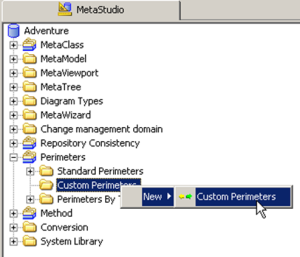
To create a perimeter, navigation of the "Meta Studio" tab in the desktop must be activated. This tab is available with "Expert" access to the metamodel. We then right-click the "Perimeter" folder and select "New/Perimeter".
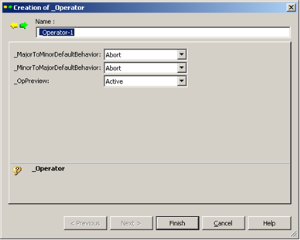
Certain properties are specified in the dialog box that appears:
• _MajorToMinorDefaultBehavior: This is the default behavior we want to give to links in direction Major Object to Minor Object. This property is positioned on "Abort". The strategy is to not propagate links so as to avoid a high-volume object set. We then specify behavior on the links we want to browse.
• _MinorToMajorDefaultBehavior: This is the default behavior we want to give to links in direction Minor Object to Major Object. This property is also positioned on "Abort".
• _OpPreview: (Active\Inactive) This property enables activation of perimeter display in the configuration MetaTool, which is covered in the next chapter.