Designing Organizations
The root org-units of the organization are created from the DoDAF 2.0 start page or the navigation tree. A global organization chart can be created to graphically show the hierarchy of org-units. If the hierarchy is too complex to be shown in a simple diagram, sub organizational charts can be added from any sub org-unit. Org-units are linked by dependency links that can be tuned to express a hierarchical or functional dependency.
To create an org-unit from the DoDAF 2.0 navigation tree:
1. Expand the folders Architectures > Architecture concerned > Operational Viewpoint > OV-4 - Organizational Relationships Chart > Org-Units.
2. Right-click the Root Org-Units folder and select New > Org-Unit.
3. In the dialog-box that appears, enter the name of the org-unit and click OK.
The new org-unit appears in the list of objects in the Root Org-Units folder. You can then specify what type of org-unit this is.
To specify the org-unit type:
1. Right-click the org-unit and select Properties.
2. In the Characteristics tab, select one of the types from the Org-Unit Type drop-down list (Company, Institute, Agency, Organization, Role, Generic, Post).
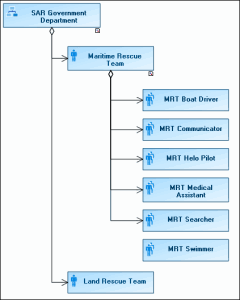
The figure below is an example of an organizational chart.
Example of Organizational-Unit Chart