Creating State Machines
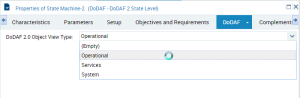
Two methods exist for creating state machines: from an activity or from the navigation tree. For a state machine to be set in the operational range, it must meet one of the following constraints: be connected to an activity or be explicitly marked as operational using the View Type property. If the property is set using the Operational Object View value, the state machine is considered an operational one. Therefore, when the user creates a new state machine in the navigation tree, the property is set to Operational Object View and states described in the state machine must relate to an operational state machine.
Other operational state machines can be created directly from an activity. In order to retrieve all the state machines, a sub-folder is added to the OV-6b folder. New state machines can be created from this location.
Once a state machine has been created it can be described using state diagrams. These diagrams contain events and successions from event to event.
To create an operational state machine:
1. In the DoDAF 2.0 navigation tree, expand the OV-6b - Operational State transition Description folder.
2. Right click Operational State Machines folder and select New > State Machine.
3. In the dialog box that appears, enter the name of the state machine and click OK.
The new state machine is created in the Operational State Machines folder.
You can change the property of the behavior in the Properties page of the folder in the DoDAF tab, DODAF 2 State Level subtab.
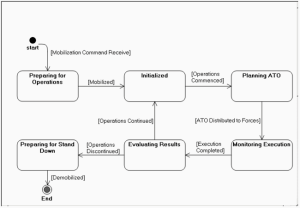
The figure below is an illustration of a state diagram.
Example of a State Diagram (Conduct Joint Force Targeting States)
An event relates to a point in time while the succession matches what happens between two events. To create a state diagram the user must remember that each arrow corresponds to a state and each graphical circle corresponds to the transition.
If a state can be reached from two or more previous states, then a synchronization object must be used.
If a state can reach two or more following states then a decision object must be used (for example the Execution Completed state in the previous figure).