Defining an Alias for a Package
Aliases are used to prefix the names of elements of a namespace when the elements are used in a namespace other than their own. The aliases identify which namespace the elements belong to when they are used in a different namespace context.
If you connect a type belonging to another namespace to your schema, the name of the type will contain the alias that you defined.
Example : d:string
The schema references the "string" type represented by alias "d".
This alias is defined in the context of the schema, and is not part of the actual namespace. A different user can define their own alias for the package as desired.
To define the alias for a package:
1. Click the schema where you plan to connect a type from another package.
2. In the properties dialog box, select the Aliases tab.
3. Click the package to which the type belongs.
4. In the urn field, enter the urn.
5. In the Schema Qualifier field, define the alias.
To connect a tag from another namespace:
1. Click the
Connect 
button.
2. In the selector dialog box, select Namespaces with urn.
3. In the dialog box that opens, select the namespace containing the types, elements and attributes to be included in the schema.
4. Click Add.
Example
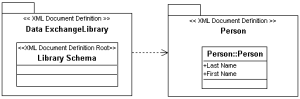
The "Library" schema wants to use the "Person" tag definition. To do this, it connects to the "Person" namespace, which contains the "Person" tag definition.
The alias given to namespace "Person" (if "Person" is the URN for the namespace) to which "Person" belongs is p.
The "Person" type will be prefixed by "p" in the Library schema.
In the document, the result is:
<Library xmlns:p="Person">
<p:Person/>
</Library>
 An alias is a short name given by the user to a URN (the identifier for a namespace).