Actors

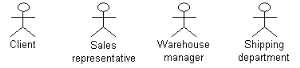
An actor represents the role played by something or someone within the enterprise environment of the modeled system. It is related to the business activities of the enterprise, and interacts with the system in different use cases. It can be an element in the enterprise structure such as a division, a department, or a workstation.
Examples of actors:
To create an actor in a use case diagram:
1. In the diagram insert toolbar, click button
Actor (UML) 
2. Click in the diagram.
The Add Actor (UML) dialog box opens.
3. Enter the name of the actor, “Receptionist” in this example.
4. Click the Create button.

If the name you enter corresponds to an actor that already exists in the repository, the
Create button becomes
Connect.
The actor then appears in the diagram.