Simple Definitions
Simple tag definitions correspond to tags typed without attributes or elements.
In XSD, the user can define simple types that restrict standard types. There are therefore three types of definition for XSD simple types
Union definition
A simple type can be a union of types. This can be useful when several countries use different formats to define a particular concept. For example, postal code is defined differently in France and the USA.
<xsd:simpleType name="USState">
<xsd:restriction base="xsd:string">
<xsd:enumeration value="AK"/>
<xsd:enumeration value="AL"/>
<xsd:enumeration value="AR"/>
<!-- and so on ... -->
</xsd:restriction>
</xsd:simpleType>
<xsd:simpleType name="zipUnion">
<xsd:union memberTypes="USState">
<xsd:simpleType>
<xsd:list itemType="xsd :int"/>
</xsd:simpleType>
</xsd:union>
</xsd:simpleType>
To define a union of types:
1. In the schema editor, select View > Type.
2. In the navigator, select the class (type) for which you want to create a union of types (in this case "postal code").
3. In the Properties dialog box, select the Characteristics tab.
4. In the Stereotype field, select "Structure" .
5. Select the XSD tab.
6. In the XSD Union field, select "yes".
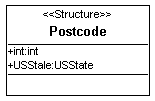
Types defined in the union are shown as class attributes.
To define the types that particpate in the union:
1. In the navigator, select the class representing the union.
2. In its properties dialog box, select the Attributes tab.
3. Click the New button.
4. Create your attributes. It is preferable to give them the same name as the union types.
5. In the Expression Type column, select the types defining the union. In this case, these are the "int" and "USState" types.
UML modeling
To create a union of types in a diagram:
1. Right-click the class and select Properties.
2. In the Characteristics tab, select the "Structure" stereotype.
3. Select the Generation tab and then the XSD subtab.
4. In the XSD Union field, select "yes".
5. Then define the types of union in the same way.
In our example, the "PostalCode" class is a union of the types "int" and "USState" These types appear in the form of attributes.
Restriction definition (facets)
A simple type can be a restriction of another simple type or a standard XSD type. By restriction, we mean "Enumeration", the limitation of the length of a character chain, definition of an interval for values, etc.
<xsd:simpleType name="SKU">
<xsd:restriction base="xsd:string">
<xsd:pattern value="\d{3}-[A-Z]{2}"/>
</xsd:restriction>
</xsd:simpleType>
In this example, we define a sku type. This is a string that must begin with 3 figures followed by a dash then 2 ascii characters.
The facets are modeled by constraints on class. Each facet corresponds to an occurence of a constraint.
To define a facet on a type:
1. In the schema editor, select the class (type).
2. In its properties dialog box, select the XSD facets tab.
3. Click the
Connect button

4. Select the list of facets and click OK.
5. In the list that appears, select the facet that you want to connect to the class and click OK.
6. In the "XSD Value" column, enter the value of the facet.
Particular case of enumeration
To model an enumeration:
1. Open the properties dialog box of the class.
2. In the Characteristics tab, select the "Enumeration" stereotype.
3. Click OK.
4. Reopen the properties dialog box of the class.
A new tab, Literal Value is now present.
5. Enter in this tab the values of the enumeration.
"List" type definition
A simple type can also be defined as a simple type list. This allows definition of lists or tables that can take as a value a list of elements of simple type.
<xsd:simpleType name="USStateList">
<xsd:list base="USState">
</xsd:list>
</xsd:simpleType>
To define a type as a list of values:
1. In the navigator of the editor, select the type in question.
2. In its properties dialog box, click the Characteristics tab.
3. In the Stereotype field, select "Expression" .
4. Select the XSD tab.
5. In the XSD List field, select "yes".
Refresh the properties dialog box of the type and return to the Characteristics tab.
6. In the Expression-Type field, select the type of value that you want to define for the type. For example, if you want the type to be a list of integers, select "int".