Creating Abstract Classes

A class can be defined as abstract. This indicates that it cannot be instantiated; there can only be instances of its derived classes.
To declare a class as abstract:
1. Right-click the class concerned and select Properties. The properties dialog box of the type appears.
2. In the Characteristics tab, select the isAbstract check box and click Apply.
UML modeling

Display the properties of the class and proceed as described above.
Example
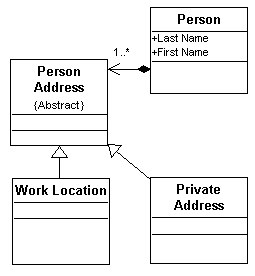
In the example below, the tags defined for the "Person" class have a sub-element called "Address".
It is defined by the "Person Address" class, but this class cannot be instantiated because it is declared as an abstract class.
Therefore only the derived tags (here "Private Address" and "Work Location") can be instantiated.
Example of an instance generated from the schema:
<Person LastName="Smith" FirstName="John">
<PrivateAddress>
...
</PrivateAddress>
<PrivateAddress>
...
</PrivateAddress>
<WorkLocation>
...
</WorkLocation>
</Person>