Modifying Writing Access Areas of Objects
If you have a writing access area of level higher than or equal to that of an object, you can modify the writing access area of this object in the object properties dialog box.
To modify writing access area of an object:
1. Connect to HOPEX.
2. In your HOPEX desktop, open the object properties window, select the General tab, then the Administration sub-tab.
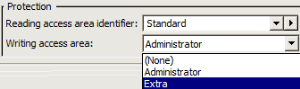
3. In the Protection pane, in the Writing Access Area field, select a writing access area via the drop-down menu.
4. 
Click
OK.
 See "Connecting to HOPEX", page 136.