Creating Questions

A question can be associated with a test conditioning its display or its mandatory aspect. It can use a document or an external reference to provide more detailed information.
To create a question:
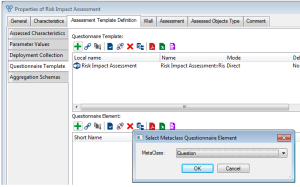
2. Click New.
3. In the dialog box that appears, select Question and click OK.

For more details on other questionnaire elements proposed, see:
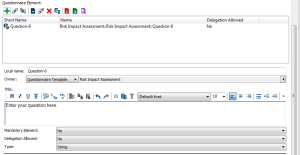
Characteristics of the question appear in the questionnaire element properties
4. Specify the Title, which represents the question as it appears in the questionnaire.
The local name of the question is not visible to the questionnaire respondent.
5. Select the answer Type enabling specification of the answer format.
6. Specify if required:
• The Mandatory Element field (indicates the mandatory or optional nature of the answer to this question).
• The Delegation Allowed field (specifies if the answer to this question can be assigned to another person by delegation).