Opening a Use Case Diagram
A use case diagram enables description of interactions between a system and actors of the organization.

A use case is a series of actions leading to an observable result for a given actor. Scenarios illustrate use cases for example.
To open an existing use case diagram, that of the "Spare Parts Purchase" package, for example :
1. In the pop-up menu of the package, select Use Case Diagram.
2. The diagram opens.
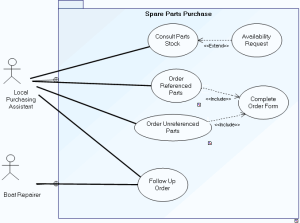
The system is used to consult parts in stock and to order new spare parts.
Consultation of parts in stock is carried out by the local on-site purchasing assistant. Following consultation, the assistant can make an availability request.
Two order types are possible, one for parts already referenced, the other for parts as yet unreferenced. In both cases, an order form should be completed.
Order follow-up is assured by the local purchasing assistant and the boat repairer.