Creating an Interaction Scenario Diagram
The interaction scenario diagram contains:
• Instances of applications, services or interfaces
• Instances of messages
Instances of applications, services or interfaces
Depending on whether the diagram describes a user interface, an application or a service, the interaction scenario diagram describes messages exchanged between application instances, service instances and user interface instances.

A Human-Machine Interface enables definition of a screen of an application or an IT service.
An IT service is a component of an application made available to the end user of the application in the context of his/her work.
To create a service instance for example:
1. Click the "Service" button

in the diagram toolbar:
2. Click on the diagram.
The Creation of Service dialog box appears.
3. Click the arrow at the right of the Represented Service box and select Propose IT Service in the drop-down list.
The list of services accessible from the current library appears.
4. Select the IT service you require.
5. Click OK.
The service instance appears in the diagram.
Message instance
Message instances define the data exchanged between application, service or user interface instances. The sequence described in an interaction scenario diagram indicates message sending order.
Message instances displayed in an interaction scenario diagram correspond with messages owned by the application that have been previously defined in another diagram.
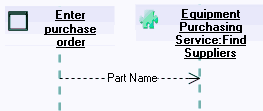
The message instance sent by "Enter Purchase Order" to "Find Suppliers Service" carries the "Part Name" message instance.
To create a message instance:
1. Click the "Message Instance" button

in the toolbar:
2. Click the dotted line under the first object and, holding the mouse button down, draw a line to the second object.
3. Release the mouse button.
The message instance exchanged between the two objects is drawn.