Specifying Entity Behavior
Behavior of a particular entity can be represented by a state diagram.
A state diagram enables representation of the different states of an entity, as well as possible transitions from one state to another.
You can create the state diagram of an entity from its pop-up menu, via command New > Diagram.
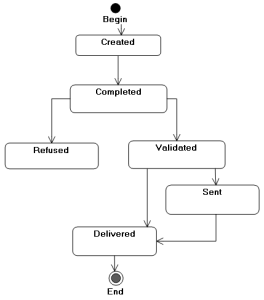
Here for example is the diagram for the "Purchase Order" entity.
A purchase order is first created, then completed by the user. It is then either refused by the purchasing representative who analyzes it, or validated. Having been validated, the order is sent and goods are delivered. If the product is available from stock, it is delivered directly.

For more details on the use of state diagrams, see the guide
HOPEX UML.
UML 2.3 Compatibility
Standard UML 2.3 replaces the state diagram by the state machine diagram.
A state machine is the set of states and state transitions which define behavior of an object.
To create the state machine of an entity and the corresponding diagram:

Right-click the entity and select
New >
State Machine.