Interface example
Take, for example, the "Flight Reservation" service.
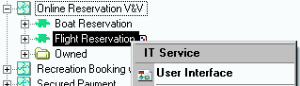
To access its user interface diagram:
1. From the Home navigation window, expand the folder "Voyage and Vacations", then "Travel and Vacation Business" and "Reservation".
2. Expand the "Application" folder and the "Online Reservation V&V" application.
3. Right-click the "Flight reservation" service and select User Interface.
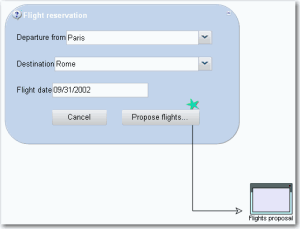
The MMI diagram opens in the Edit window.
The interface is presented in the form of a dialog box, in which various fields must be completed.
• Departure city
• Destination
• Flight date
A button cancels the request, another button opens a second interface.