Term Use Principles
Using existing terms
The same term can be connected to several Dictionary type objects.

A dictionary type groups all the objects that can be connected to a term : concepts, concepts type, individuals, components or classifications.
When creating a dictionary type object, you can choose to use an already existing term, or create a new term.
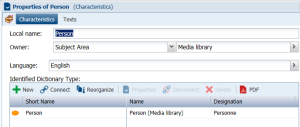
To consult the list of concepts connected to a term:
1. Expand the folder that corresponds to the subject area that interests you.
2. Expand the "Terms" folder and select the term that interests you.
The properties of the term open in the edit area.
3. Select the Characteristics tab.
The list of objects connected to the term appears in the Identified Dictionary Type table.

Objects for which the term is declared as a synonym do not appear in the properties dialog box.
You can create a
Dictionary Type from a term.
Creating a concept from a term
To create a concept from a term:
1. Right-click the term that interests you and select New > Concept.
The concept creation wizard opens; the local name of the concept and its subject area are predefined from the term.
2. Click Next.
3. In the Definition Text field, enter the text of the concept definition and click Finish.
The new concept is created with the name of the term and is associated with the same subject area.
Creating a term when creating an object
When creating a dictionary type object, if no term is explicitly connected or created, a new term is automatically created in the data language. This term carries the name of the object created.
Certain MetaClasses are obligatorily associated with at least one term. This is the case for example for Concept, Concept Type, State Concept.
Other MetaClasses can be associated with a term, without this being obligatory. These are objects defining links between dictionary elements, for example Concept Structural Component.
If an object is associated with a term, its properties dialog box contains a
Designation section, a
Definition Text field and a
Synonyms. section For more details, see
"Links between concept, term and synonym".
Creating terms in multiple languages
From dictionary type object, you can associate terms for each of the data languages of your environment.
To create a term from a concept, for example:
1. Open the properties of the concept that interests you and select the Characteristics tab.
2. In the Designation section, click the New button.
A term creation dialog box opens.
3. Specify the Local Name of the term.
4. Select the Language and click OK.
The new term appears in the concept properties.
Creating synonyms in multiple languages
A synonym is a term interchangeable with another term in the context of a concept of this term that has the same or almost the same meaning.
Synonyms for dictionary type objects can be added in multiple languages. This function serves to indicate to the user that a concept defined and used in a certain context corresponds to other synonyms in another language.