Defining a Concept View
HOPEX Information Architecture proposes a tool allowing you to make best use of your concept views.
These views are then accessible in a report. For more details, see
"View Reports".
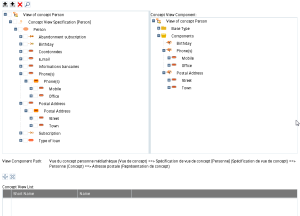
The view editor is made up of a number of parts:
• the left part that presents all the concept components held by the view, as defined in the subject area,
• the right part that presents the concept components that will be kept for the view created,
• the buttons in the upper left that are used to define the components of the view created,
• the "View component path" that presents how a component is present in the view,
• the "Concept view list" that presents the views associated with a concept that will be a concept held by the view.
To add a component to the view created:
1. Select the component that you wish to add to the tree in the left part.
2. Click Add an Embedded Component.
The component added appears in the tree on the left with a specific icon showing that it is "embedded".

You can
Add a referenced component in the same way.