Inviting Persons to Your Collaborative Workspace
Once your collaborative workspace has been created, you can invite other persons to participate in your work.
To invite persons to your collaborative workspace:
1. From your HOPEX desktop:
• Windows Front-End: in the HOPEX menu bar, select File > Workspace > Manage Participants.
• Web Front-End: click Main menu > Collaborative Workspace > Management Participants.
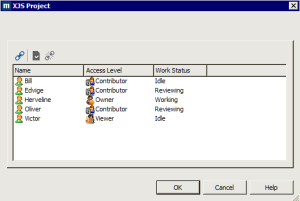
The collaborative workspace participants dialog box appears.
2. Click
Connect 
.
3. In the add persons dialog box, select the person you wish to invite to share your workspace.

Use the [Ctrl] key to select several persons at the same time.
4. Click Add.
The person is added to the list of participants in the collaborative workspace as Contributor.