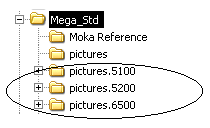
In HOPEX Web Front-End, in the diagram pop-up menu, select Properties.In HOPEX Web Front-End, in the diagram pop-up menu, select Properties.If you want to use the old shapes, you must select the value "Before HOPEX 5.2" or "After MEGA 5.2" in the Shapes Version list box.If you want to use the more recent shapes, you must select the value "After HOPEX 2005" in the Shapes Version list box.
|
Versions
|
Shapes storage folder
|
|
Earlier than 5.2
|
MEGA_STD\Pictures.5100
|
|
Version 5.2 or later except version 2005
|
MEGA_STD\Pictures.5200
|
|
Version 2005
|
MEGA_STD\Pictures.6500
|
|
Version 2009
|
MEGA_STD\Pictures.7220
|
|
HOPEX V1 and higher
|
MEGA_STD\Pictures.7600
|