HOPEX Explorer
:
HOPEX Explorer
:
HOPEX Explorer Desktop Description
:
Desktop Display
:
Hiding Navigation Panes
Hiding Navigation Panes
To enlarge the read/edit area, you can hide desktop navigation panes.
To hide navigation panes:
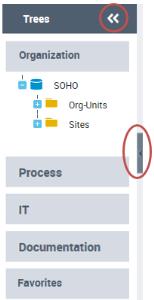
click the small central arrow on the right-hand edge of the navigation pane, or
click the double arrow in the
Trees
header.
The navigation panes are hidden.
 click the small central arrow on the right-hand edge of the navigation pane, orclick the small central arrow on the right-hand edge of the navigation pane, orclick the double arrow in the Trees header.