Assigning Types to Attributes
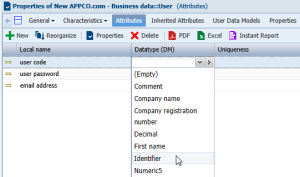
When the datatype package has been referenced for the data model, the list of types it contains is available on each attribute of entities of the model. All that is required is to select the one that is suitable.
To define the type of an attribute:
1. Right-click the entity that contains the attribute.
2. Select Properties.
The properties dialog box of the attribute opens.
3. Click the drop-down list then Attributes.
4. In the Datatype (DM) box corresponding to the attribute, select the desired type in the list.
5. Click Apply.