Multiplicities
Each role in an association has an indicated multiplicity to specify how many objects in the entity can be linked to an object in the other entity. Multiplicity is information related to the role and is specified as a completely bounded expression. This is indicated in particular for each role that entities play in an association.
Multiplicity specifies the minimum and maximum number of instances of an entity that can be linked by the association to each instance of the other entity.
The usual multiplicities are "1", "0..1", "*" or "0..*", "1..*", and "M..N" where "M" and "N" are integers:
• The “1” multiplicity indicates that each object of the entity is linked by this association once and once only.
• The “0..1” multiplicity indicates that at most one instance of the entity can be linked by this association.
• The “*” or “0..*” multiplicity indicates that any number of instances of the entity can be linked by the association.
• The “1..*” multiplicity indicates that at least one instance of the entity is linked by the association.
• The “M..N” multiplicity indicates that at least M instances and at most N instances of the entity are linked by the association.
|
1
|
One and one only
|
|
0 / 1
|
Zero or one
|
|
M..N
|
From M to N (natural integer)
|
|
*
|
From zero to several
|
|
0..*
|
From zero to several
|
|
1..*
|
From one to several
|
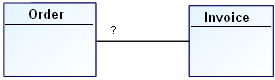
Example:
0 / 1 | An order corresponds to zero or at most one invoice. |
* | No restriction is placed on the number of invoices corresponding to an order. |
1 | Each order has one and only one corresponding invoice. |
1..* | Each order has one or more corresponding invoices. |
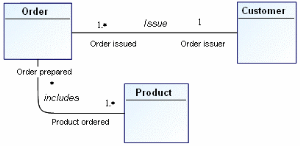
Other examples of multiplicity:
1..* | A client can issue one or more orders. |
1 | An order is issued by one and only one client. |
1..* | An order contains one or more products. |
* | A product can be contained in any number of orders, including no orders. |
0 / 1 | A person works for a company. |
1..* | An alarm is triggered by one or more sensors. |
1 | A sensor covers one and only one zone. |
1..* | A window displays one or more strings. |
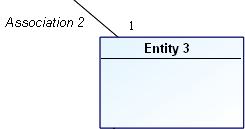
To specify role multiplicity:
1. In the data diagram, right-click the line between the association and the entity, to open the pop-up menu for the role.
2. Click Properties.
The Properties dialog box of the role opens.
3. Click the drop-down list then Characteristics.
4. In the Multiplicity field, select the required multiplicity.
The representation of the association changes according to its new multiplicities.

In MEGA Windows Front-End, multiplicity is also displayed in the role's pop-up menu. If the menu you see does not propose multiplicity, check that you clicked on that part of the line indicating the role and not the association.